AI features in this update are optional (where permitted by your school’s AI policies).
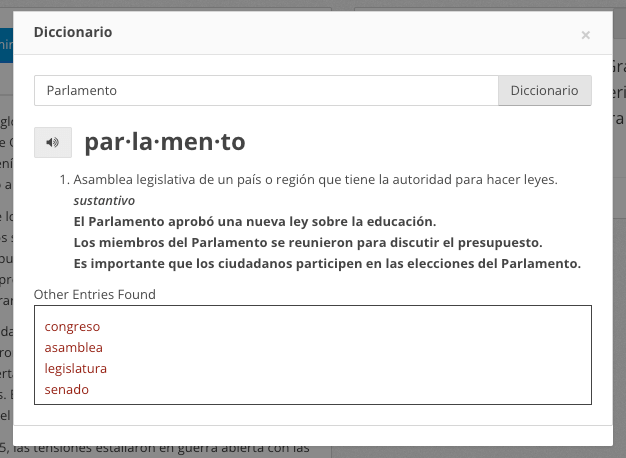
Upgraded Spanish Dictionary and Vocabulary Features
The optional Dictionary and Vocabulary “student tools” settings available when activating an assessment for the student portal will now provide information in Spanish for assessments in Spanish.
Upgraded Spanish Special Character Selection
Students typing in short or extended responses on Spanish assessments will have a new, convenient panel of spanish characters they can add to their responses.
Admin “Student Work Analysis” Reports
Campus and district admins now have a specific report section on students’ written work, including the ability to view students’ writing. To check it out, go to the Reports tab, select, a report, and click the “Student Work Analysis” tab.
Accountability Forecasts from Cambium/TEA Interim Data
For Texas schools and districts, ALL In Learning can turn data from many systems (including common assessments delivered using ALL In Learning) into the Texas Accountability (Domain) report formats and calculations, so your team can see “What if this had been the STAAR?” And now, we’ve added Interim STAAR data to the system files we can import into these reports. To inquire about getting these Accountability report views, see this article or contact support@allinlearning.com.
Plus More!
We’ve also made these updates and fixes:
- Update: Ability to easily add Spanish special characters
- Update: AI Question Assistant (where permitted by your school’s AI policies) added to Home tab for convenience
- Update: AI grading of student work responses using the equation editor (where permitted by your school’s AI policies)
- Update: Faster overnight Reading Passage of the Day AI-assisted grading (where permitted by your school’s AI policies).
- Update: Prevent distributed assessments from being activated as AI Writing Workshop (where permitted by your school’s AI policies) activities
- Update: A completed assessment can only be reactivated as AI Writing Workshop (where permitted by your school’s AI policies) if it was originally activated as AI Writing Workshop (where permitted by your school’s AI policies) (and vice versa).
- Update: Chrome cache performance upgrades for AI Writing Workshop (where permitted by your school’s AI policies)
- Update: AI-assisted Insight to Action reports (where permitted by your school’s AI policies) – performance upgrades
- Fixed: Student portal “read” button handling passages with 4,000+ words
- Fixed: “Generate more like this” feature (where permitted by your school’s AI policies), ability type number of requested questions
- Fixed: Previewing assessments shared via embed links
- FIxed: AI Writing Workshop (where permitted by your school’s AI policies) chat message duplicates
- FIxed: Display issue with New York standards
AI features are optional and available where permitted by the AI policies and requirements that apply to your school. We disable any AI tools restricted by the policies that apply to your school.